

Linear lights are often mounted along the top of a glass showcase. Once the fixture is in place, however, the merchandise, display stands, or viewing angles may change. If the direction of the light is fixed as well, it may no longer serve the products you want to highlight. A bright line may also appear as a reflection in the glass. When designing a showcase, it is useful to consider both where the light will be mounted and how its direction can be adjusted afterward.
Our Only Series custom linear lighting configuration lets the entire light body rotate in place after it has been fixed. The configuration featured here supports 360° rotation. The linear light changes its direction while its mounting position remains in place. We typically position this type of lighting at the top of a glass showcase and choose its initial direction around the merchandise layout.
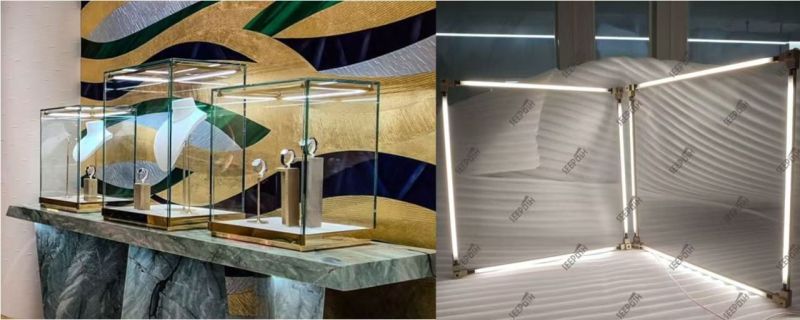
Set the Mounting Position, Then Adjust the Light Direction
The mounting position and the rotation of the light body answer different questions. Ruolo determines how far the fixture sits from the products, glass, and case edges. Rotation determines where the light is directed from that position. With the Only Series configuration shown here, we can continue adjusting the latter after the fixture has been fixed.
For example, a group of jewelry might move from the center of a case toward the front. We can first check whether the original top mounting position still works, then rotate the light body and review how the products are lit. If the height of the merchandise, its stands, or the glass boundaries have also changed, rotation alone may not be enough. The fixture position and case structure should be reviewed again.
The 360° figure describes the rotation capability of this featured configuration. It does not mean that every direction will produce the same lighting result in every showcase. Check the top frame, glass, wiring, and space available for adjustment when defining the installation.
Check the Merchandise and the Glass Together
A glass showcase should not be judged only while its door is open. As the direction of a linear light changes, bright areas on the products may move, and reflections of the light in the glass may change too. A straight-on photograph can miss what customers see as they approach from the side.
We recommend placing the actual merchandise, or representative samples, in a sample showcase and checking the following:
- Look at the products first. Are the main display positions lit as intended? Are there unwanted shadows or overly bright areas on the front and sides of the products or their stands?
- Look at the glass next. From the front and from the angles where customers are likely to stand, check whether reflections of the bright line compete with the merchandise.
- Test the adjustment range. Rotate the light body and compare product illumination with glass reflections. If the display will be rearranged, test the alternative product positions as well.
Whole-body rotation gives us a way to adjust the direction of the light; it does not automatically remove reflections or shadows. The result also depends on the case dimensions, glass, product surfaces, and distance between the fixture and the merchandise. Review it in a sample case that reflects the intended installation.
Confirm Color Rendering Alongside the Custom Configuration
The Only Series solution featured here is a custom combination of linear lights for glass showcases. We can discuss how the lights should be arranged for the case layout and how they should be aimed after mounting. The exact combination and installation details are defined in the selected design and drawings.
This featured configuration can also achieve a color rendering index (CRI) greater than 95. For jewelry, watches, and other products where material colors and details matter, color rendering is one parameter to check. The number does not replace a review in the showcase: light color, product materials, other store lighting, and reflections in the glass all affect the appearance. Confirm the CRI requirement and final specification for the configuration selected for your project.
If you are still comparing linear lights with other fixture types, see our jewelry showcase lighting specification checklist. This Only Series guide focuses on retaining control over the direction of an entire linear light after its top mounting position has been set.
What Should You Send Us to Discuss a Solution?
Send us a front elevation, section drawing, and details of the showcase top. Mark the available mounting positions, expected locations of products and stands, glass boundaries, and main viewing directions. If the display changes regularly, include two or three common layouts. We can use these details to discuss the light arrangement and initial direction, then identify the angles and reflections to check in a sample showcase.
You can review our customization process or contact us with your drawings and reference images.
Frequently Asked Questions
Does the Only Series light rotate as a whole, or do individual heads rotate?
In the custom configuration discussed here, the entire light body rotates in place after it has been fixed. The direction of the linear light changes as a whole; this is not a feature involving a single adjustable head.
Does 360° rotation remove the need to plan the top mounting position?
No. Rotation changes the direction of the light, while the mounting position still determines its relationship to the products, glass, and case edges. Set the position first, then use a sample case to check the available adjustment space and the effect of different directions.
Is a CRI greater than 95 standard for every Only Series light?
It is a specification available for the custom configuration featured here. Confirm the color rendering requirement and corresponding specification when selecting the final lighting solution for your project.


