

Display cabinet lighting zones help turn a display intention into a usable lighting brief. Shelf light can keep a row of products legible, accent light can emphasize a featured position, and background light can shape the appearance of the backdrop. The cabinet needs the combination that serves its merchandise and operating requirements.
For designers, shopfitters and merchandising teams, the next step is to describe how those tasks should work together. Identify which lights need to change independently, then review the available fixture and control arrangement with the supplier. Keep the product view central when approving the combined result.
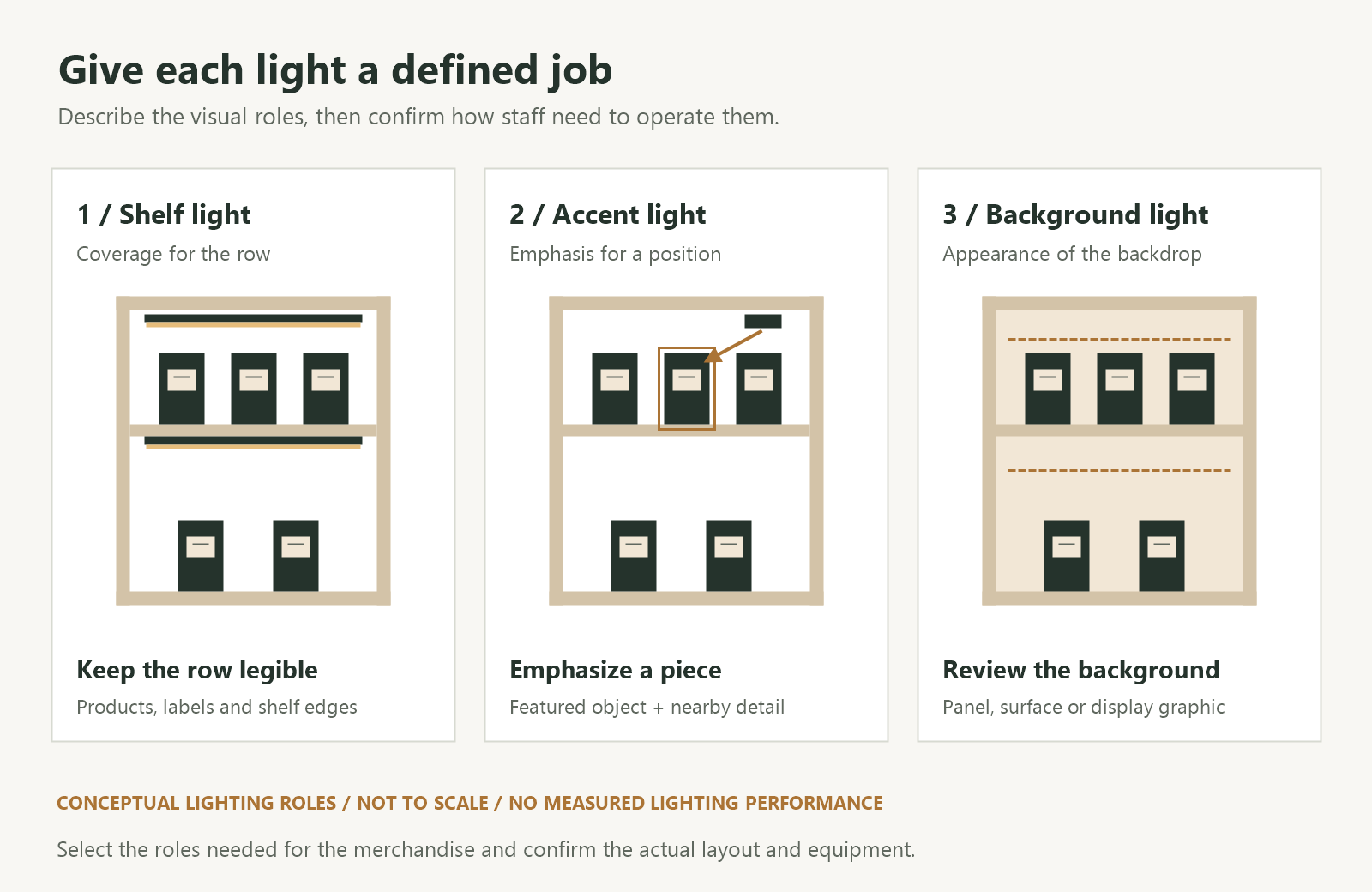
1. Give Each Lighting Zone a Defined Job
Mark the products, shelves, featured positions and background surfaces on the cabinet drawing. Describe what customers should be able to see at each point. This provides a basis for selecting the lighting and deciding how it should be operated.
Use shelf, accent and background lighting as a starting framework:
| Visual role | Task to describe | Review point in the cabinet |
|---|---|---|
| Shelf light | Make a row of products and relevant information visible | Coverage of the intended product surfaces, labels and shelf edges |
| Accent light | Draw attention to an agreed product or position | Emphasis on the featured piece while surrounding details remain usable |
| Background light | Establish the appearance of a panel, surface or graphic behind the merchandise | Its relationship with product outlines, finishes and the full display |
Choose the roles required by the project. A simple cabinet may serve its viewing tasks with one lighting arrangement. A changing display may need several roles with different operating requirements. Include the proposed merchandise and finishes when making that decision.
One fixture can also contribute to more than one role. Our combined linear and accent lighting article discusses specific combination configurations. Confirm the available functions and connections of the selected model when bringing it into the zoning brief.
2. Plan Shelf Light Around the Complete Row
Identify the surfaces customers need to see across each shelf. Include front labels, product outlines and relevant information positioned near the merchandise. Check the intended product setback and the difference between front and rear rows.
Review the fixture position with the shelf above, brackets and side panels in place. Tall packaging or a deep shelf can change the light that reaches products farther back. Include the end positions of the row as well as the center in the sample review.
Where several shelves have the same operating task, they may be proposed as one control group. Explain whether staff also need to adjust an individual shelf or retain different settings between levels. The supplier can then confirm the suitable equipment and connection arrangement.
If shelves move, bring the planned alternative positions into the review. Our adjustable shelf lighting guide covers the connections, layouts and product views to check after a change. Keep the zone descriptions aligned with the approved shelf arrangements.
3. Coordinate the Accent and Background with the Merchandise
Mark the featured product and the customer positions from which its emphasis should be apparent. Compare the accent light’s direction and coverage with the actual support and nearby merchandise. Record whether that featured position is fixed or moves during display resets.
ERCO’s explanation of accent lighting describes how directional light and its contrast with the surroundings affect emphasis and the perception of shape and texture. In the cabinet sample, assess those effects against the product details and the display intention.
Describe the background task separately. It might be an illuminated panel, a lit graphic or a surface reached by another fixture. Include the material, color, position and required appearance in the brief. The custom light guide panel specification guide gives more detail for panel-based backgrounds.
Review the background with the merchandise in front of it. Check product outlines, reflective packaging and the relationship between the featured piece and the rest of the cabinet. Agree the balance under the intended store lighting and retain the settings associated with that arrangement.
4. Translate Visual Roles into Control Groups
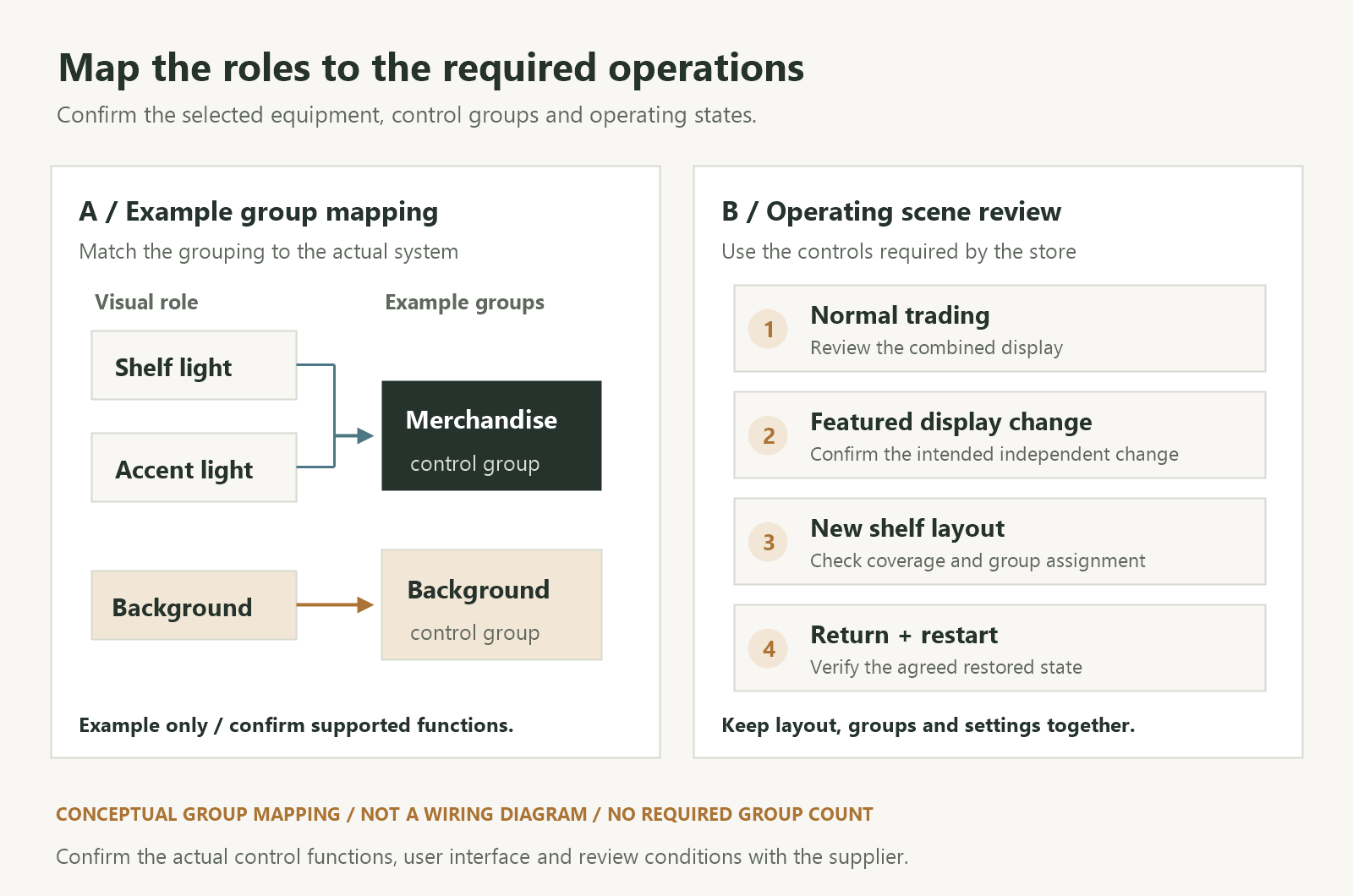
A visual role describes what the light does. A control group describes which equipment responds together to an operation. Record both in the cabinet brief so the design intention can be checked against the proposed hardware and control functions.
For example, a cabinet could use a combined shelf-and-accent arrangement operated as one merchandise group, with its background adjusted separately. If staff need to change the accent while retaining the shelf setting, describe that additional operation and ask the supplier to confirm how the selected arrangement can provide it.
For a DALI project, the DALI Alliance’s introduction explains that devices can be programmed to operate in groups. Confirm the devices, grouping and user interface selected for the actual project. Record which control or scene command acts on each equipment group.
Start with the operations the store needs, such as these:
| Operating use | Operation to confirm | Merchandise view to retain |
|---|---|---|
| Normal trading | Bring the required groups to the agreed operating state | Row details, featured product and background work together |
| Featured display change | Adjust the intended accent or merchandise group while retaining any required other settings | The new featured piece is emphasized and adjacent items remain legible |
| New shelf arrangement | Apply the controls assigned to the revised approved layout | Relevant shelf levels and labels remain visible |
| Return or restart | Restore the agreed scene or operating state | The accepted group balance can be checked again |
Keep the full fixture, driver and control schedule alongside this table. The dimmable showcase lighting checklist covers the compatibility and operating states to confirm with the proposed equipment.
5. Review the Groups Separately and in the Full Display
Use a representative cabinet with the proposed merchandise, supports, background and final glass. Within the operating conditions agreed for the selected system, review each group so the team can identify its contribution. Then evaluate the complete trading state.
Keep the layout and viewing positions recorded while comparing settings. When a background adjustment changes the product’s emphasis, note the relevant group and the settings before and after the change. Check the full row as well as the featured position.
Inspect the display from the main stopping point and the approach route, including side views where the cabinet is seen from several directions. Look for information obscured by shadows or highlights, visible light sources and reflected images. Our glass display lighting reflections guide provides the checks for identifying the contributing source.
Operate the actual controls in the sample. Confirm that the intended equipment changes, that settings required to remain in place are retained, and that the agreed return or restart operation works. Tie any observation to the layout, connected equipment and control state used during the review.
Where measured lighting requirements form part of the brief, agree the measurement points, operating conditions and acceptance criteria. Keep those results with the corresponding combined display state. Photographs are useful arrangement records; use the actual sample and the agreed measurements to assess the lighting requirements.
6. Record the Scene and Group Arrangement for Staff
Give each control group a name that relates to its task, such as shelf rows, featured position or background panel. Show its equipment on the drawing and identify the control staff use to operate it. For a fixture serving several roles, keep the available adjustment functions clear in the instructions.
Provide a short record for each approved operating state:
- Display layout: Products, shelf positions, featured support and background arrangement.
- Group map: Fixtures, drivers and associated control equipment assigned to each operation.
- Control action: Interface and command used, including switching, adjustment or scene recall where specified.
- Accepted settings: The recorded values or positions for the proposed controls and equipment.
- Review conditions: Store lighting, glazing and customer viewpoints used for approval.
- Reset procedure: How to return to the approved state and who reviews a revised display.
Check the instructions with the staff role expected to use them. If a featured piece moves or a shelf is added, identify which parts of the arrangement require another review. Keep the revised layout and control record together.
For a SEEPOSH display cabinet lighting enquiry, share the cabinet drawings, merchandise layout and required control operations. Include the shelf coverage, featured positions and background effect you need, so the proposed lighting arrangement can be reviewed against the same brief.
7. Frequently Asked Questions About Display Cabinet Lighting Zones
Does every cabinet need three independent lighting groups?
Define the viewing tasks and operations first. The required shelf, accent and background roles may be provided by different equipment arrangements. Ask the supplier to confirm which functions can be operated together or independently for the selected configuration.
Can one fixture provide shelf light and accent light?
A suitable combination configuration can contribute to both roles. Confirm its model-specific optics, connections and available controls. If the brief requires separate adjustment of the two effects, include that requirement when reviewing the proposed fixture and system.
How bright should the background be compared with the products?
Agree its appearance in the actual cabinet with representative merchandise, finishes and surrounding lighting. Check product outlines, readable details and the intended emphasis. Record the approved settings and any project-specific measurement criteria for that arrangement.
Will changing a control group solve a reflection problem?
Identify the contributing source and viewing position before selecting an adjustment. Group control may help compare conditions, while the fixture position, aiming, product orientation and glass still need review. Check the accepted result in the complete operating scene.


