

Display cabinet LED drivers need a defined place in the cabinet drawings. A slim light can fit neatly under a shelf while its driver, connectors and service opening still need space elsewhere. Once the cabinet is assembled, an overlooked cable exit or inaccessible fixing can make a routine replacement difficult.
For designers, shopfitters and procurement teams, the useful starting point is a coordinated layout: the selected lighting configuration, a suitable driver location, the cable routes and a practical way to reach the equipment. Confirm these together before the joinery details are released for production.
1. Confirm the Lighting Configuration Before Reserving Space
Start with the fixture schedule. Record the model, quantity and configuration of each light, including the lengths of linear lights and the equipment assigned to each control zone. Ask the lighting supplier to identify the proposed driver and provide its current datasheet and installation instructions.
The required output type matters. A constant voltage fixture needs the specified supply voltage and a suitable permitted load. A constant current fixture needs the specified current and an appropriate output voltage range. MEAN WELL’s explanation of LED driving methods describes these operating modes; the selected fixture’s requirements determine which arrangement the project needs.
Keep the complete driver model and option identifiers in the schedule. A different dimming version may change the connections or associated equipment that needs room in the cabinet. Review control compatibility using our dimmable showcase lighting checklist, then bring the confirmed equipment into the physical layout.
Use a short coordination schedule to connect the electrical selection with the cabinet drawing:
| Item | Information to record | Cabinet detail to review |
|---|---|---|
| Lighting load | Fixture models, quantities, lengths and control zones | Space for the complete driver and control arrangement |
| Driver | Full model, output requirements and installation conditions | Mounting position, orientation and available compartment |
| Connections | Cable exits, connectors and any separate control modules | Room to connect, disconnect and route cables |
| Cable route | Start and end points, actual route length and moving parts | Protected passages and accessible connection points |
| Service access | Cover, fixings, tools and removal sequence | Reach to the equipment and a clear withdrawal path |
2. Reserve the Complete Installation Envelope
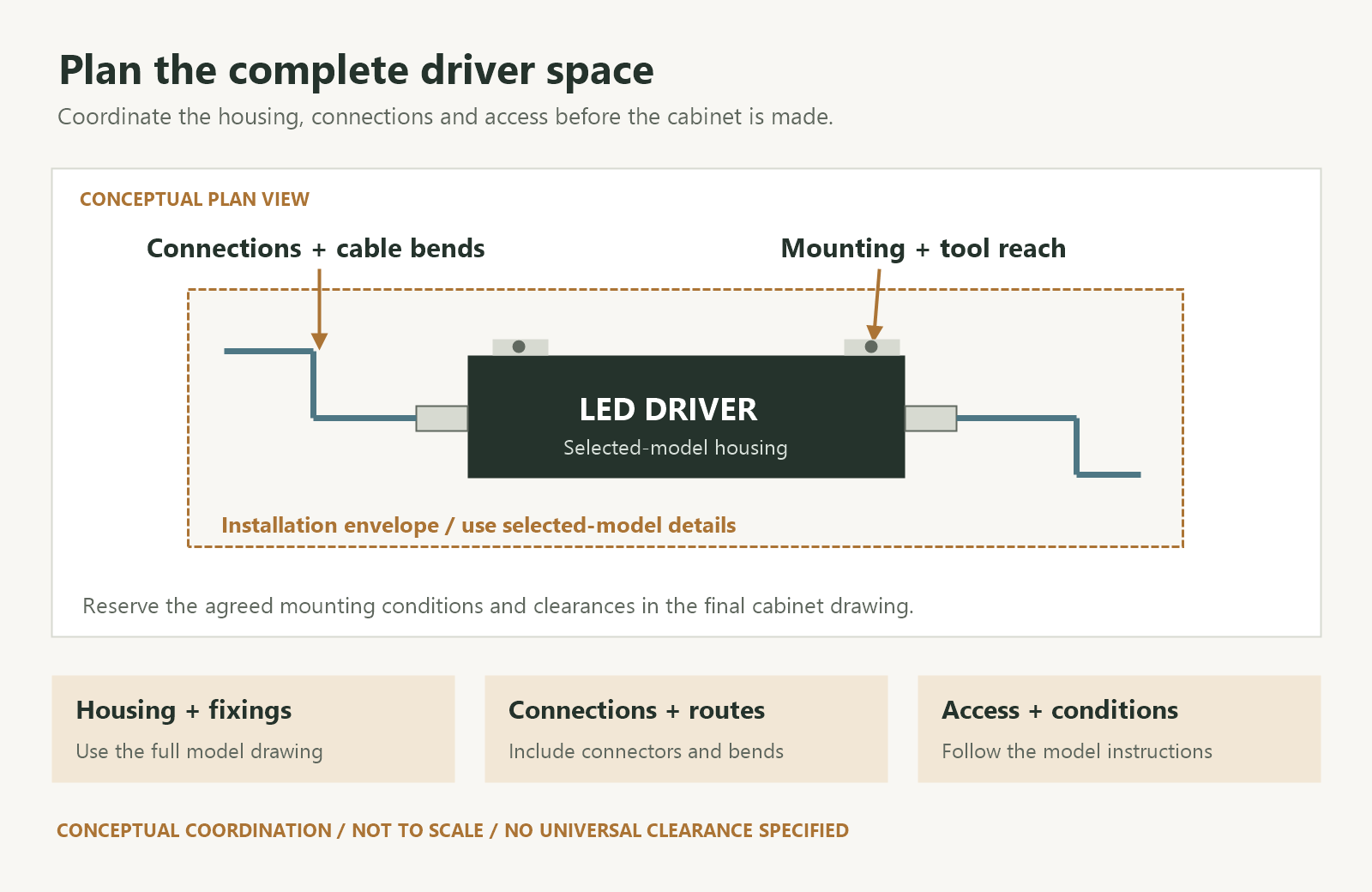
Place the actual driver outline in the cabinet plan and section. Add its mounting points, cable exits, connector bodies and any terminal covers or cable clamps required for the selected version. This gives the cabinet maker a usable installation envelope.
A shallow compartment may accommodate the housing while leaving too little room for a connector or the cable bend at its end. Check the direction in which cables leave the driver and the space needed to operate the connections. Include access for the fixing tools as well as the cables themselves.
Where a supplier proposes an alternative driver, compare its full installation envelope with the approved drawing. Similar wattage does not establish that the replacement fits the same recess. Keep the drawing revision and equipment schedule aligned, especially when joinery and lighting are ordered separately.
For puck lights inside display cabinets, coordinate this equipment space with the top-panel mounting details. The visible fixture and the concealed supply equipment have separate space requirements that need to appear in the same cabinet package.
3. Review the Location Under Finished Cabinet Conditions
Consider the proposed driver location with the cabinet closed and its surrounding equipment in place. A rear service compartment, a base section and an accessible adjacent enclosure each have different implications for heat, cable distance and maintenance. Select the location around the actual cabinet construction and the chosen equipment’s instructions.
MEAN WELL’s LED power supply installation manual calls for ventilation and identifies mounting orientation and ambient temperature as conditions that can affect allowable output. Apply the selected model’s clearance and mounting requirements to the finished enclosure.
Ask the supplier or electrical professional which temperature checks are needed and where to measure them. Record the relevant operating conditions, including connected load, nearby equipment and the installed covers. Where the driver specifies a case-temperature measurement point, keep that location identifiable for the review.
Reserve the agreed space in the drawing and keep it available during installation. Packaging, spare stock and additional control equipment should have their own planned locations. If the compartment changes, review the driver arrangement again before approving the revised cabinet.
4. Draw the Cable Routes to Each Lighting Group
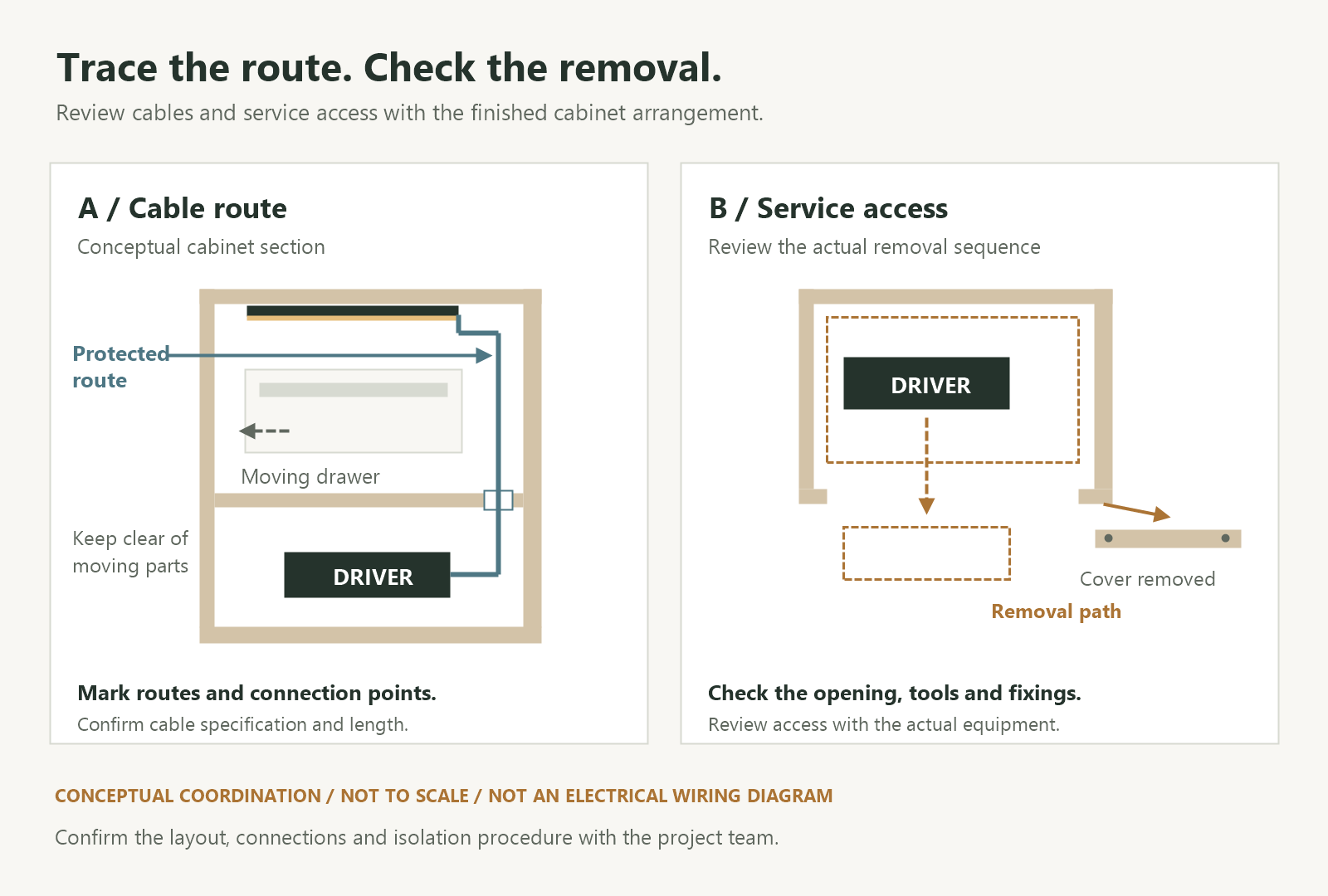
Show how cables travel from the supply equipment to the lights. Mark transitions through cabinet panels, connections between sections and any part of the route that passes near drawers, hinges or removable shelves. Record the routed length, including the path around obstructions.
Moving a driver outside the display case can improve access, but the resulting cable route needs review. MEAN WELL’s cable-extension guidance identifies voltage drop and possible changes in electromagnetic compatibility as considerations when extending output cables. Ask the supplier to confirm the permitted route and cable specification for the selected combination.
Coordinate mains input, driver output and control wiring as distinct routes in the drawing. The electrical professional should confirm cable ratings, insulation, routing or separation requirements and protection at panel penetrations for the chosen equipment. Identify connectors by function and destination so each lighting group can be traced during installation and service.
For a cabinet assembled from several modules, agree where each connection can be reached after assembly. A connector hidden between permanently fixed panels may be difficult to inspect even when the driver itself is accessible. The route and its connection points belong in the same review.
Keep details of movable shelves for a separate check: the connection must accommodate the intended shelf arrangement and the approved method of adjustment.
5. Make Driver Replacement Access Visible in the Drawing
Draw the opening through which a technician reaches the driver. Identify the removable cover or panel, its fixings and the approach needed for tools. Check access with the cabinet in its final position, including any wall, adjoining cabinet or fixed plinth that affects the opening.
Then review the removal sequence with the shopfitter. Can the driver be disconnected, released from its mounting and withdrawn through the opening? Does a connector or bracket obstruct that path? Will access require moving merchandise, taking out a shelf or removing another component? Record those dependencies so the service arrangement is understood before production.
Review the proposed access with the actual driver and connector arrangement in a representative cabinet section.
Plan the isolation method with the electrical team. MEAN WELL’s installation instructions require the supply to be disconnected before installation or maintenance and protected against unintended reconnection. A qualified electrical professional should carry out the work using the selected equipment’s procedure and the project’s applicable requirements.
Keep equipment identification readable from the service position. Record the full model, installed settings where relevant, lighting zone and drawing revision in the handover documents. These details help the maintenance team identify the approved replacement configuration. Our existing showcase replacement checklist covers the fixture and system information to review when replacing installed lighting.
6. Send a Coordinated Brief Before Production
Send the lighting supplier and cabinet maker the same drawing revision. Include the following information in the brief:
- Lighting schedule: Fixture models, quantities, linear lengths and the intended control groups.
- Driver arrangement: Proposed model and options, location, mounting details and installation conditions to confirm.
- Available space: Compartment dimensions, cable exits, connectors, associated equipment and required access.
- Cable layout: Routes, lengths, panel passages, module connections and nearby moving parts.
- Service sequence: Access panel, tools, isolation arrangement and removal path to review.
- Approval record: Agreed equipment, drawing revision and any fit, operating or temperature checks required for the cabinet.
Use the sample review to resolve these details while the cabinet layout can still be adjusted. Record the configuration actually reviewed, including any temporary components, so its findings can be compared with the production arrangement.
The custom retail lighting RFQ checklist provides a broader framework for quotations and sample approval. For a SEEPOSH display lighting enquiry, share your cabinet drawings and fixture requirements, including the proposed driver location and service opening, so the lighting arrangement can be discussed with the cabinet details available.
7. Frequently Asked Questions About Display Cabinet LED Drivers
Can the LED driver be installed outside the display cabinet?
It can be considered when the selected equipment and project arrangement permit it. Confirm the mounting environment, output cable route, cable specification and access to the connections. The longer route must be reviewed with the lighting supplier and electrical professional before the location is approved.
How much space should be left around the driver?
Use the selected model’s installation instructions. The available space must accommodate its housing, connections and mounting requirements, as well as the specified clearance and access for servicing. Include these requirements in the cabinet drawing rather than applying one spacing figure to every driver.
Can a higher-wattage driver replace the specified one?
Review the replacement’s output type, voltage or current requirements, operating range and control function with the supplier. Also check its housing, connectors and installation conditions. A higher wattage rating alone does not confirm electrical compatibility or a suitable fit in the approved compartment.
What should the cabinet maker receive before production?
Provide the approved driver model and drawing revision, installation envelope, mounting position, cable routes and service opening. Include the connector arrangement and the checks required on the representative cabinet. Keep the lighting supplier, cabinet maker and electrical team working from the same equipment schedule.


